

When it comes to budget hosting, two popular, well-established names that repeatedly come up are Hostinger and Namecheap. Both offer solid services for individuals and small businesses, and they’re known for really good WordPress support.
But with so many claims of top performance and unbeatable value, how do you truly know which one is right for your project?
At first, I thought it would be difficult to declare a true “winner” from our two contenders. However, while Namecheap does have its strong points, many of them aren’t found among its shared hosting services. To truly compare it to Hostinger in terms of features and value, you’d have to look at Namecheap’s EasyWP managed WordPress plans. (And sadly, Namecheap falls short even there).
In this head-to-head review, I’ll dig into all the good and bad details of both providers (no, Hostinger isn’t perfect) to show you which one excels when it comes to features, pricing, and performance. Overall, there’s so much that Hostinger offers WordPress site owners that Namecheap just can’t beat. Read on for all the details.
Pricing and Plans
Cheap Doesn’t Always Mean Good
I wouldn’t fault you for thinking Namecheap beats Hostinger in the all-important price wars. After all, its 3 shared hosting plans all cost less than Hostinger’s similar options. Namecheap’s best prices only require a 2-year plan. In contrast, you have to sign on for Hostinger’s 4-year term to get its lowest prices – but during these four years, you’ll end up paying less.
Namecheap draws you in with its super-affordable shared hosting plans that start at $1.98, which provide adequate resources for a small business site. Sure, that doesn’t sound like a bad deal at first, but these plans are comparable in price to Hostinger’s entry-level plans, which also include WordPress management.
Look a little more closely, though, and it becomes clear that Hostinger offers more value for your money. Let’s see how Namecheap’s EasyWP hosting plans compare to Hostinger’s WordPress plans.
For starters, Namecheap’s managed WordPress plans only cover 1 website and the EasyWP Starter plan is pretty bare bones, with only 10 GB SSD storage and basic security. In fact, the entry-level EasyWP Starter plan even offers fewer features than the Stellar shared hosting plan. If you’re comfortable using WordPress and managing your own updates, you might be better off with a Namecheap non-WordPress plan.
Comparatively, Hostinger’s Premium plan includes 25 websites, 25 GB SSD storage, unlimited bandwidth, and free domain, email, and site builder. Don’t get me wrong, you’ll get similar features with Namecheap too – just on the higher-tier plans.
Generally speaking, Namecheap and Hostinger both offer a free domain name with most plans. Here again, Hostinger comes out ahead. You can choose from a number of popular TLDs, while Namecheap only offers a select few TLDs (and unfortunately, .com isn’t one of them).
Hostinger provides lifetime access to unlimited free Let’s Encrypt SSLs on all its plans. Namecheap, on the other hand, only supplies 1 free cPanel PositiveSSL for one year on a shared hosting plan. After a year, you have to purchase one of Namecheap’s SSL plans if you stick with shared hosting.
Alternatively, you can migrate to an EasyWP plan, as these include a PositiveSSL certificate from Sectigo.
To sum it up, Namecheap can’t really compete with Hostinger when it comes to its plans and pricing. Neither its shared nor EasyWP plans offer the resources that Hostinger’s plans do. And Namecheap’s EasyWP plans are more costly than all but Hostinger’s Cloud Startup plan.
Features
Hostinger’s Plans Provide Far More
I firmly believe that when comparing two providers, it’s not just how many features they offer, but also how useful those features are for running and managing your website.
Hostinger and Namecheap offer up to 100 GB of storage on shared and WordPress plans (the only exception is Namecheap’s Stellar Plus plan, which offers unlimited storage). The important detail, though, is that Namecheap relies on SSD storage, while Hostinger offers NVMe storage on its Business and Cloud Startup plans. NVMe storage is newer and faster than SSD, which helps your loading speeds and overall visitor experience.
Another important difference is the Content Delivery Networks (CDNs) that both providers offer. Hostinger’s CDN improves page load times and user experience by caching content and minimizing code so it loads quicker. It’s included in the Business plan and up.
Namecheap’s Supersonic CDN also focuses on security, offering DDoS protection and a custom SSL. Here’s the catch – there’s a traffic limit of 50 GB per month (unlike Hostinger’s CDN). To get the most out of Namecheap’s CDN, you’ll have to buy an additional plan.
One of Hostinger’s best and most unique features is its proprietary hPanel, which is highly intuitive and great for all skill levels. It has a clean, minimalist design that allows you to easily work with Hostinger’s various features. Namecheap uses cPanel, which is the industry standard. Depending on your experience level, it may have a steeper learning curve. EasyWP plans do come with a proprietary panel, though.
While both hosts offer WordPress optimization features, there are significant differences in those features. Hostinger includes a WordPress auto-updater, staging tool, and 1-click plugin and theme management through hPanel.
Namecheap’s EasyWP plans provide Softaculous for installs and updates, but no integrated staging or advanced management panel. You’ll have to get these features via WordPress and manage them on your own.
You can see more similarities and differences between the managed WordPress plans in the table below.
| Hostinger | Namecheap | |
|---|---|---|
| Hosting types | Shared, managed WordPress, cloud, reseller, VPS | Shared, managed WordPress, cloud, reseller, VPS, dedicated servers |
| Free domain name | Yes, for one year (Premium and up) | Yes, limited TLDs (EasyWP Turbo and up) |
| Free SSL | Yes | Yes |
| Number of websites | 25 to 100 | 3 to unlimited |
| Storage | 25 GB SSD–100 GB NVMe | 10 GB SSD to unlimited SSD |
| Bandwidth | Unlimited | Unlimited |
| Control panel | hPanel | cPanel |
| Free CDN | Hostinger CDN | Supersonic CDN |
| Managed WordPress | Managed installation, AI site builder, auto updates, suggested and preselected plugins, tutorials | Managed installation, WordPress site builder, auto updates, tutorials |
| Money-back guarantee | 30 days | 30 days |
Performance
Hostinger’s Speed and Uptime Are Impressive
Unless this is your first visit here, you’ll know that we pride ourselves on thoroughly testing each host. Today’s contenders were both subjected to that rigorous process. (You can find all the details on how we test hosting providers).
First on the list: data centers and their locations. Namecheap only has 4 data centers, located in Arizona, Singapore, Amsterdam, and the UK.
Hostinger, on the other hand, offers 12 locations. They’re located in the US (Arizona, New York, and Massachusetts), Brazil, France, Germany, Lithuania, the UK, the Netherlands, India, Indonesia, and Singapore.
Both hosting providers offer CDNs to improve speed and UX. Another feature they have in common is the use of LiteSpeed servers, although Namecheap hasn’t migrated all its hosting to LiteSpeed yet and is still relying on its original slower Apache servers.
Hostinger, meanwhile, automatically offers LiteSpeed Cache for WordPress (LSCWP) with a one-click installation in hPanel, providing faster load times, advanced optimizations, and better performance under high traffic for WordPress sites.
Let’s see how they did in our tests.
GTmetrix
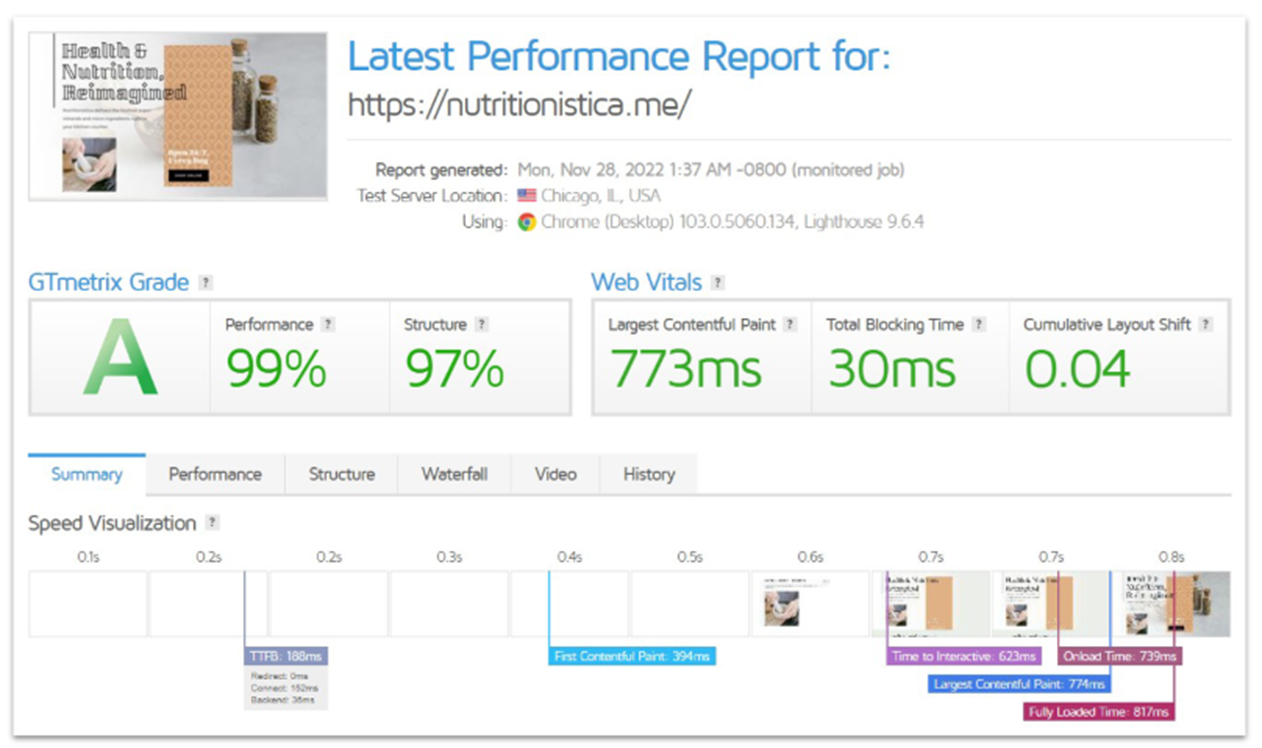
Hostinger’s GTmetrix scores were great. Our site earned an A grade, with a recorded .08 seconds fully loading time. You can find more testing and performance details in our expert review.
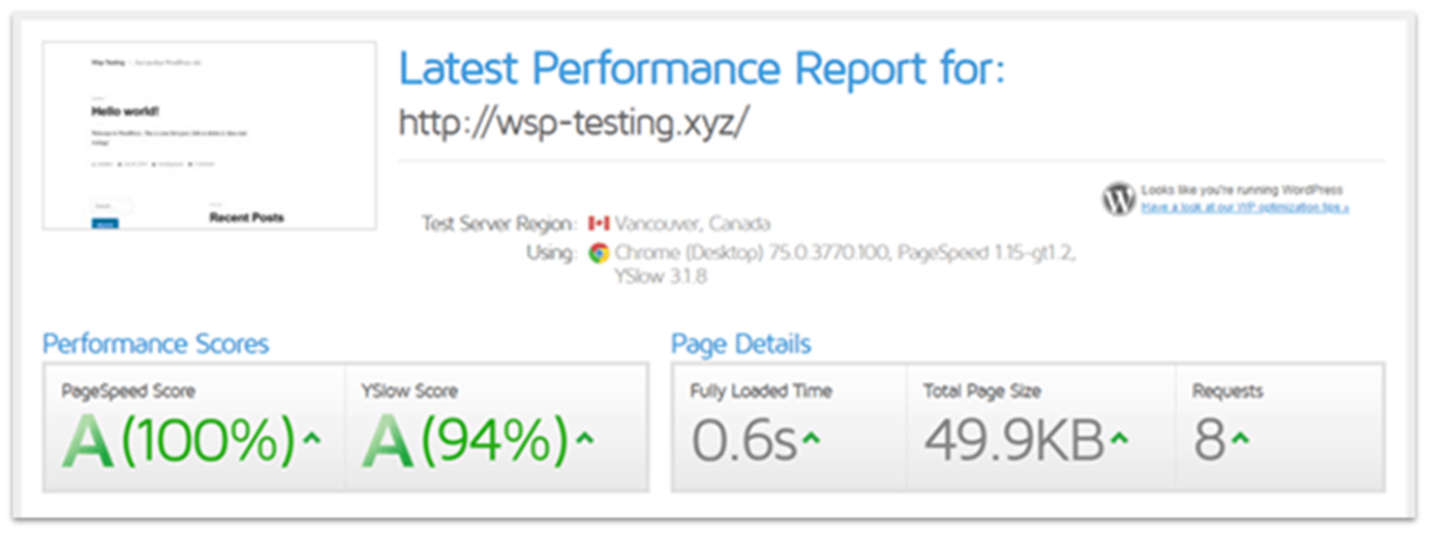
Likewise, GTmetrix also gave our Namecheap test site an A score. And a bit surprisingly, our Namecheap site’s fully loaded time was .06 seconds, just a bit faster than Hostinger. You can see all the details on Namecheap’s performance and more in our in-depth review.
UptimeRobot
Namecheap offers a 100% uptime guarantee on all but its reseller and VPS hosting plans, which we found it couldn’t meet. Hostinger, on the other hand, gives you a 99.9% uptime guarantee on all plans – or only 44 minutes of downtime a month.
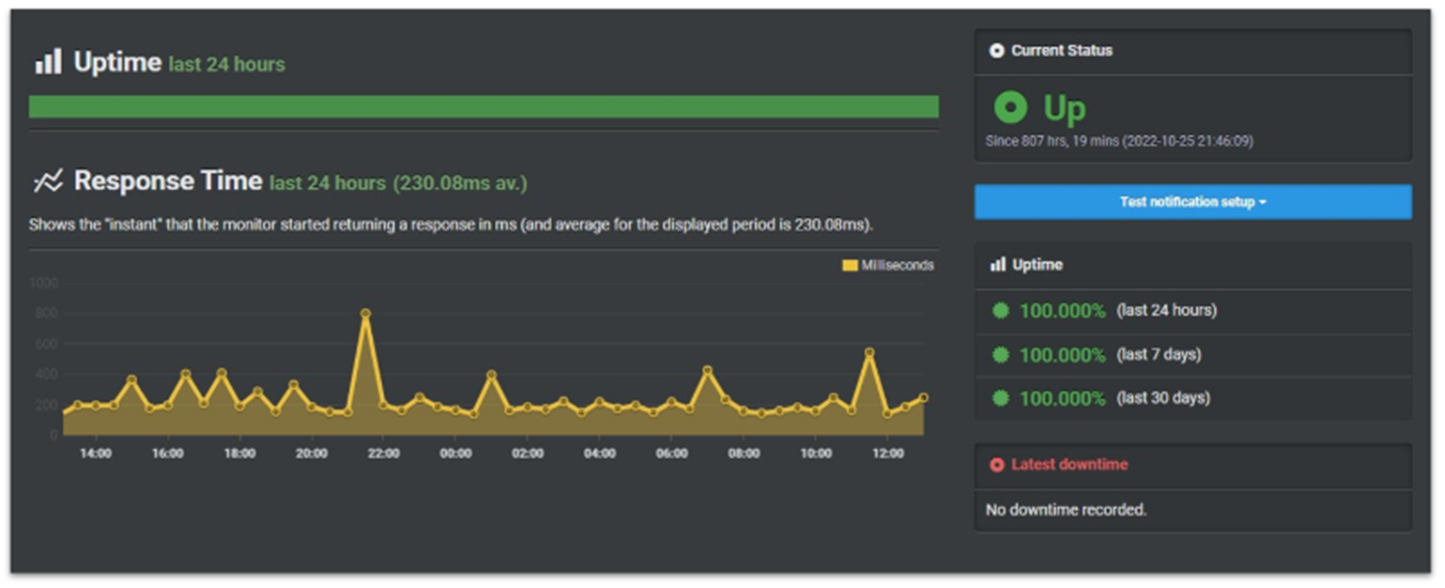
Most ad people will tell you it’s better to underpromise and overdeliver than to do the opposite. That’s exactly what I found with Hostinger. While it only promises 99.9% uptime, Hostinger actually had 100% uptime over 30 days.
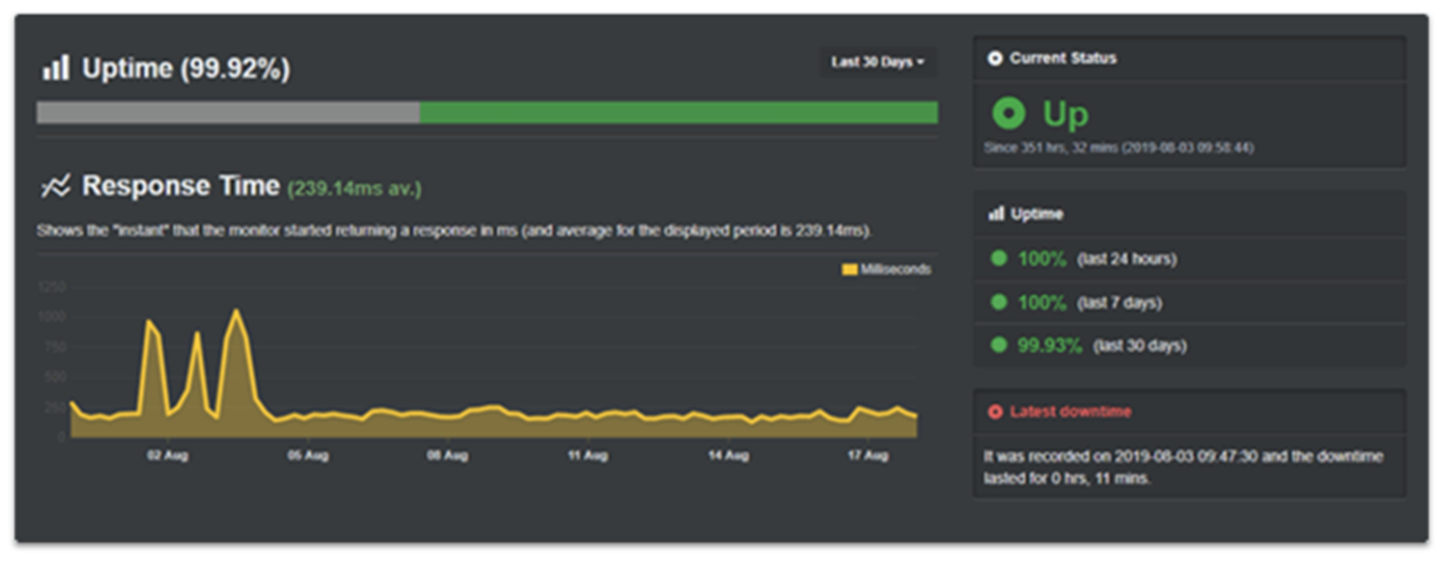
Namecheap talks a big game with its 100% uptime. My results, however, did not match up to that promise. Namecheap turned in 99.93% uptime, with 11 minutes of downtime over the 30 days of testing. Eleven minutes may not seem like much, but it’s still enough time to lose out on sales or potential customers.
Speed is important but it’s not everything with hosting. Yes, Namecheap’s loading speed was slightly better than Hostinger’s results. But Namecheap’s uptime results once again fall short. Hostinger wins the performance competition, too.
Security
With Namecheap, Peace of Mind Comes at a Cost
You won’t get daily backups with any starter plans. Hostinger’s Premium plan includes weekly automated backups and Namecheap’s shared hosting plans do one better with backups twice a week. Daily backups for both hosts are available on higher-tier plans. Strangely, the more expensive EasyWP plans only provide a manual backup tool.
It’s a big strike against Namecheap that it only offers a free SSL for your first year on its shared hosting plans. After that, you’ll need to purchase them separately.
The unlimited Let’s Encrypt SSLs from Hostinger are free for the life of your account. Let’s Encrypt SSLs are also easier to install (and are easily turned on via hPanel), while Namecheap’s cPanel PositiveSSL often requires more tech skills. Hostinger also auto-renews your SSL certificates for you.
Both competitors offer a decent level of security as standard. Hostinger offers BitNinja Security Suite on all its plans, which provides DDoS protection, brute force defense, Cloudflare protected nameservers, and IP reputation protection. You’ll also get automatic weekly malware scanning and auto-removal.
Namecheap’s standard security includes ModSecurity firewalls, manual malware detection and removal, DDoS protection, and domain protection (if you’ve purchased your domain through Namecheap). As with its SSL certificates. Namecheap requires you to purchase third-party services or an EasyWP plan to receive enhanced site security features like automatic malware detection and removal.
When it comes down to it, Hostinger offers “set it and forget it” security tools, which is a far more convenient option than Namecheap.
Support
Hostinger’s Service Outshines Namecheap
When your website is down or compromised, quick access to support is the difference between minutes and hours of lost business. Both hosts offer 24/7 live chat support, a ticket system, and a DIY knowledge base. Neither offers any phone support.
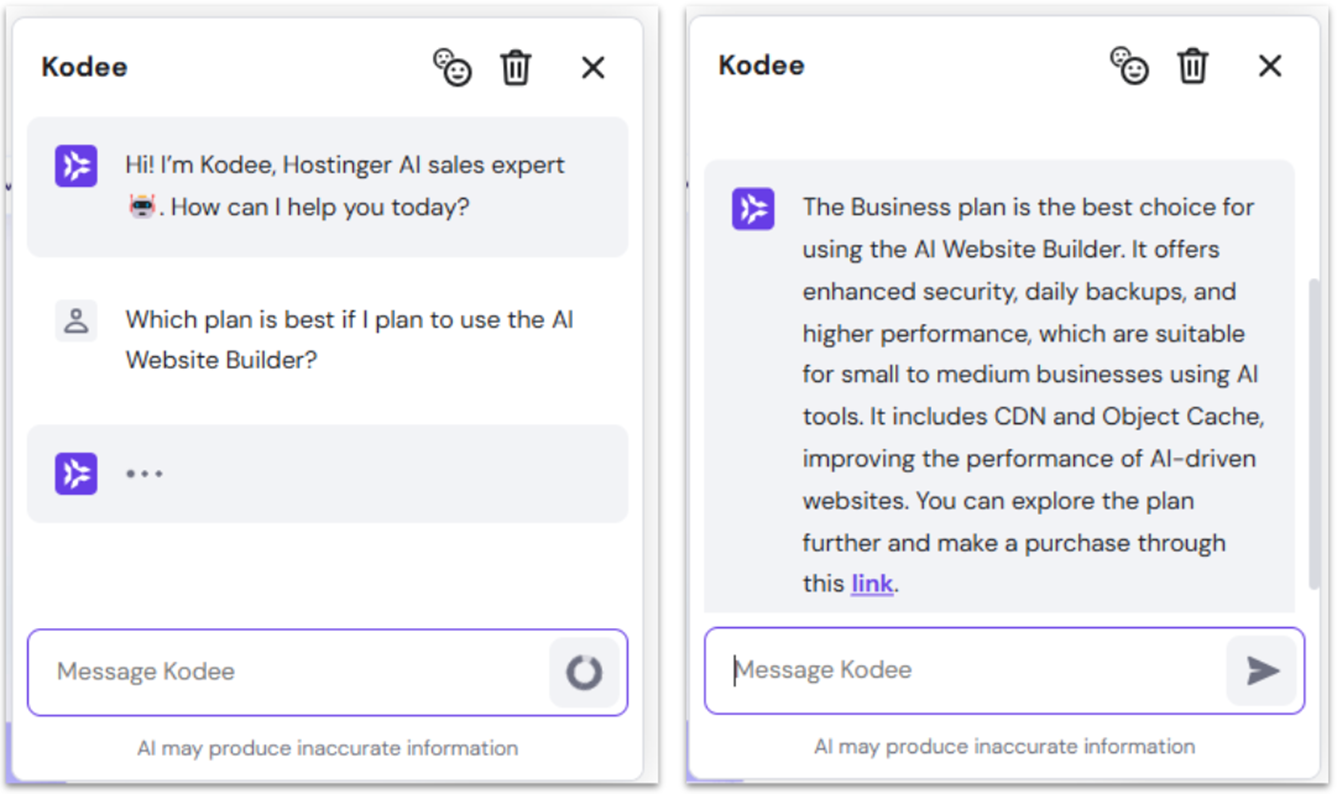
Recognizing that many questions come before becoming a customer, Hostinger has introduced Kodee, an AI “sales expert” to help you with questions about plans, features, pricing, and more. Kodee was online within 2 seconds of my query and had a response in the same amount of time. It’s also trained for first-line tech support, so it can offer assistance or guide you to the appropriate knowledge base article in seconds.
Hostinger’s online technical support chat can be a bit slower, taking about 15 minutes to respond. The response was somewhat helpful, though it only directed me to knowledge base articles that I could have eventually found myself.
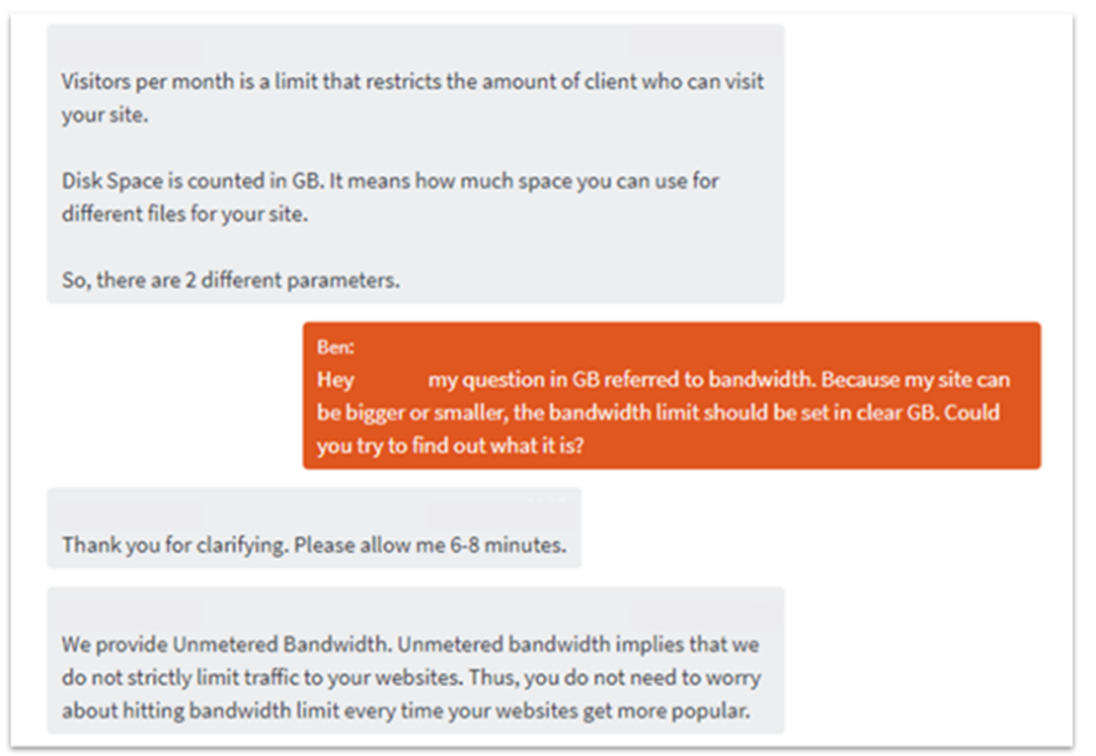
Namecheap’s online chat leaves much to be desired and requires a good deal of patience. While the response times were faster than Hostinger’s, the agents were far less helpful. In one instance, the agent gave the completely wrong answer. In another, I had to spend a long time clarifying my query, and then had to wait while the agent looked up the info or consulted with someone else.
On the other hand, it took about 20 minutes to get a response from Hostinger’s ticket system – a rather rapid time in the world of hosting ticket systems. After my encounter with the inefficient support at Namecheap, I didn’t try its ticket system. My patience was worn thin enough.
Hostinger’s support team seems to rely pretty heavily on its knowledge base. Support provided more links to its knowledge base, which mirrored my chat request. After checking it out, I think I can understand why. Hostinger’s knowledge base is quite extensive, well-organized, and media-rich with video tutorials, step-by-step walkthroughs, and screenshots to guide you.
By comparison, Namecheap’s knowledge base is hard to navigate and relies mostly on textual content. Much of its content is full of tech lingo and jargon. So much so that an inexperienced site owner might have a difficult time using it. All in all, I was completely underwhelmed with Namecheap’s support.
It’s Clear: Hostinger is the Better Choice
Hostinger clearly pulls ahead of Namecheap in several key areas. Not only does it offer more competitive pricing, but it also packs in better value with free automated daily backups (on most plans), advanced security via BitNinja, and faster website performance thanks to LiteSpeed servers and built-in caching solutions.
Support is another strong point for Hostinger. Its 24/7 live chat is faster and more helpful, especially for beginners, while Namecheap can be slower and less competent in its responses. However, even if I can’t wholeheartedly recommend its hosting, Namecheap is still a solid choice for domain services (and there’s no rule you can’t host both separately).
If you’re still not sure about either host, you can check out nine other excellent hosting providers that we’ve tested and recommend.
FAQs
How do Hostinger and Namecheap’s renewal prices compare?
Namecheap’s renewal prices are typically lower than Hostinger, particularly on the shared hosting plans. Remember that you’ll have to renew more frequently – Namecheap only offers a maximum of a 2-year plan, while Hostinger offers a 4-year plan. The difference in price may not favor Namecheap in the long run. Don’t forget, you’ll also have to pay Namecheap for your SSL certificate after the first year.
Between Hostinger and Namecheap, which provider is better for WordPress hosting?
While Namecheap’s EasyWP is user-friendly, Hostinger offers more value for WordPress plans, along with speed and reliability. It’s a reliable choice for growing blogs or small businesses.
How do the control panels compare between Hostinger and Namecheap?
Hostinger’s hPanel provides a clean, modern interface that offers easy management for domain, hosting, caching, and WordPress maintenance. Namecheap primarily uses cPanel, which is a little more complex and typically requires additional steps to get the same results. cPanel may be fine for experienced site owners, but hPanel has a broader appeal. If you’ve never used cPanel, you can take a look at our beginner’s guide to using cPanel to learn the basics.
Are there hidden costs with Namecheap or Hostinger?
Both hosts are fairly transparent with their pricing and plan descriptions. However, Namecheap’s shared hosting plans only offer a free SSL certificate for a year. Likewise, there’s no free email on some EasyWP plans. On the other hand, a common complaint with Hostinger is the difference between its introductory and renewal costs, although renewal costs are still lower than most competitors.